Best prompt for enhanced any image
Prompt 1:
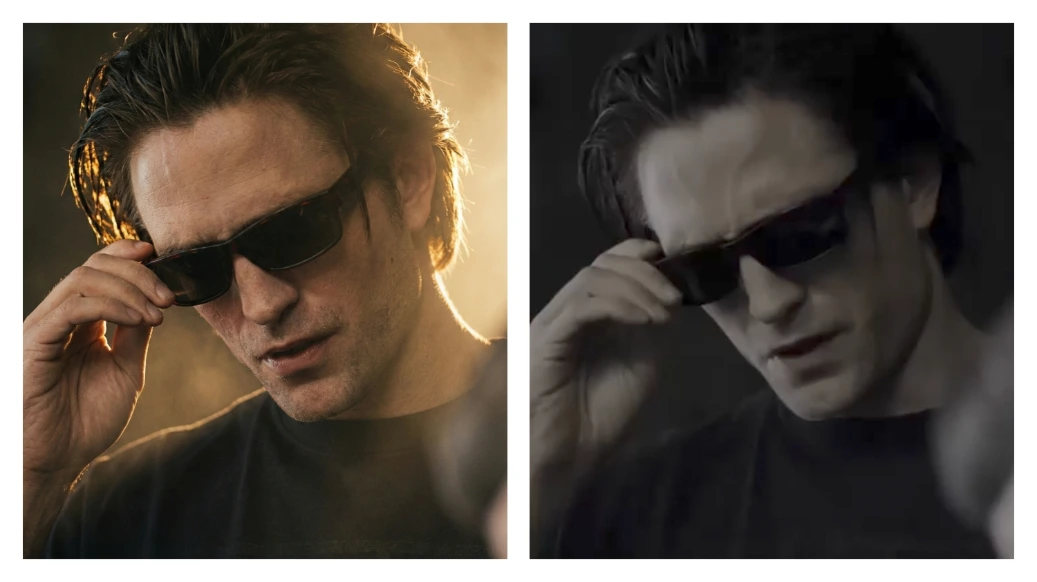
Enhance the original photo while keeping the pose, background, face, clothing, and framing exactly the same.
Transform ONLY the lighting, atmosphere, and camera quality:
LIGHT + ATMOSPHERE:
create a dreamy cinematic golden backlight or side-light depending on the natural light direction of the scene- add subtle atmospheric haze ONLY around the light source so the light glows, but keep the overall scene clear- apply soft highlight bloom blur on bright areas (cheeks, shoulders, hair edges) without reducing detail add clean halation glow that melts only the light
edges into the background, not the subject
introduce a gentle diffused ambience, avoiding
any heavy fog or smoke soften transitions between light and shadow for a smooth, creamy cinematic look- add controlled volumetric light rays with softly blurred edges-blur ONLY the light glow, not the subject or scene
CAMERA QUALITY UPGRADE:
enhance clarity, texture, and micro-contrast to match a Sony A1 / Canon R5 full-frame camera-improve dynamic range so highlights and shadows retain detail- reduce noise and artifacts for a clean, high-end professional look
add rich cinematic color depth and natural skin tones- increase lens sharpness while keeping the dreamy lighting intact- simulate high-end glass with subtle lens bloom and smooth bokeh depth
Do NOT change: pose, background, facial structure hair shape, clothes- proportions
Only enhance lighting, glow, atmosphere, and upgrade overall camera quality to a premium cinematic full-frame look.
Here’s the 2nd prompt:
Apply this prompt on this image.
Enhance the existing photo only — keep the original framing, angle, composition, and facial proportions exactly the same. Do not crop, zoom, or convert to a close-up. Improve overall image clarity and sharpness naturally, with special attention to eye detail while keeping the full face and original framing intact. Refine focus slightly for better definition without making it overly sharp. Apply soft, natural cinematic lighting correction, preserving realistic shadows and depth already present in the image.
Enhance natural skin texture with visible pores and fine details — no beauty smoothing, no skin softening.
Remove digital noise and compression artifacts while retaining organic texture.
Improve dynamic range and contrast subtly, with muted highlights and rich mid-tones.
Maintain accurate, organic skin tones with realistic color balance.
Add very subtle cinematic film grain for a professional movie-still look.Background should remain exactly as it is, only slightly cleaner if noisy - no artificial blur added.
Preserve all facial features, expressions, hair strands, and natural imperfections.
Photorealistic result, professional camera look, high-quality enhancement only - no stylization.
NEGATIVE PROMPT (CRITICAL)
close-up, zoomed-in, cropped face, changed framing, face alteration, reshaped features, beauty filter, oversmoothed skin, plastic skin, waxy texture, Al face, cartoon, anime, CGI, illustration, painting, artificial blur, fake bokeh, harsh lighting, flat lighting, over-sharpening, halos, HDR look, distorted eyes, asymmetry, extra details, digital artifacts, smartphone filter look.
3O: RECOMMENDED SETTINGS (IMPORTANT)
Image-to-Image Strength / Denoise: 0.15 - 0.30
CFG / Guidance: 5-7
Steps: 25 - 35
Face Restoration: OFF
Upscale: After final result only (2x max)
Seed: Fixed (for consistency)